
Autocraft
Craft from the items on your hard drives, plan whole crafting chains, and run farms from a floppy.
Autocraft turns a computer with hard drives into a crafting system. It plans the whole chain of crafts, takes the ingredients from the drives and puts the results back.
What it can craft
Autocraft searches the server's whole recipe registry, including datapacks and other mods.
- It runs shaped and shapeless crafting recipes, and the mod's own reusable-tool recipes, with Minecraft's own matching and remainder rules.
- It lists furnace, smithing, alloy and special recipes too, but those need their own machines or special inputs, so it does not run them.
Use the app
Open Autocraft from the desktop.
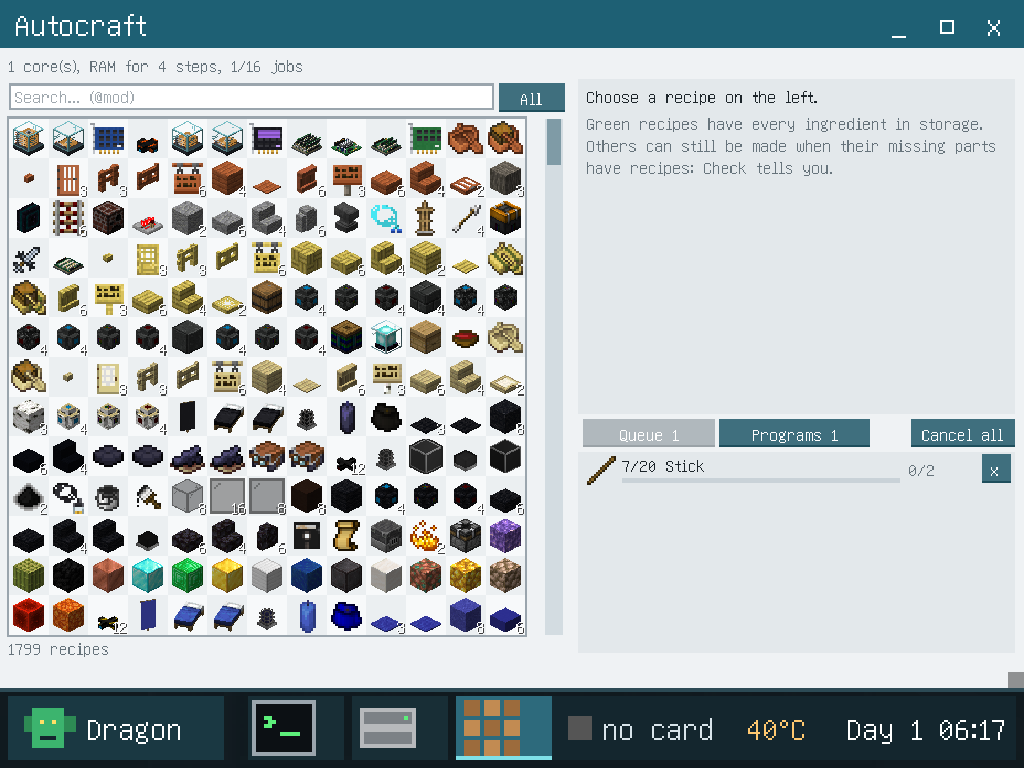
- Search for a recipe or item. All shows every recipe; Ready shows only the ones you have every ingredient for. Green recipes are ready; the others can still be made when their missing parts can be crafted.
- Select a recipe. It is drawn 3 × 3, cycling through accepted alternatives, with what you need and what you have for the number of crafts you choose.
- Check simulates the crafts and says whether the chain is ready, or what blocks it.
- Craft checks again and queues the job.
The Queue tab shows each job's progress; cancel one job or Cancel all. The Programs tab lists saved jobs with Run and Delete.
Planning and hardware
Autocraft plans missing intermediate crafts before it schedules a job, and checks that the results fit in the drives' free space. Each step either completes on every drive or changes nothing.
| Hardware | Planned steps per craft |
|---|---|
| A DragonCPU on its own | 4 |
| Each 8 KiB RAM module | +4 |
| Each 32 KiB Banked RAM module | +16 |
| Limit | 96 |
One running processor core does one step every half second. Add running processors to the network to work on several jobs at once, up to eight cores; see Memory, CPUs and cooling. The app's header shows the current cores, step budget and jobs.
Intermediate results and container remainders go back to the drives. If inputs, space or hardware change, a queued step waits and checks again. Completed steps and their items survive saving.
Note
Jobs act as the player who queued them, with that player's permissions, and run while that player is online.
Save a job
- Write floppy saves the job to a writable floppy in your main hand.
- Save program saves it to a hard drive, where it costs 16 KB and appears under Programs.
Floppy-controlled farms
A floppy with a saved job repeats that job whenever its inputs arrive. This makes a crafting farm.
- Boot DragonOS, open Autocraft and select a recipe. Hold an unused
 Blank Floppy Disk
and click Write floppy.
- Insert the floppy into a spare
 Floppy Disk Drive on a running DragonOS
network.
- Connect a hard drive and a
 Storage Import Port. Hoppers and Fabric item
transport can feed raw items into the port.
- Connect a
 Storage Export Port with a hopper under it leading to the output
chest.
The export port receives the final product; reusable tools and intermediate results stay on the drives. A full export port waits for space. Eject the floppy to stop its pending steps.
Tip
For a first farm, select Crafting Table and feed oak logs into the import port. The farm crafts planks first, then the table: one log becomes one table in two crafting steps.
The farm runs while its owner is online and the network is loaded. A  Chunk Loader
keeps it running while the owner is in another dimension; see
Configuration.