
IP, routing and DHCP
Addresses and prefixes, gateways and static routes, DHCP servers and clients, and the errors a real network gives.
The network carries a full IPv4 stack. Hosts have an address, a prefix and a routing table; switches route between subnets; DHCP hands out addresses.
How a computer sends a packet
- A destination on the card's own subnet is reached directly, after ARP finds its MAC address.
- Anything else goes to the gateway (the default route) or a matching static route.
- With no route, the computer reports
Network is unreachable. - Replies follow the replying computer's own routes. A computer without a gateway never answers across subnets, just as in reality.
Set an address
| Where | Static address | DHCP |
|---|---|---|
| Desktop Network window | Fill Address (CIDR, such as 10.0.0.5/24) and Gateway, then Set static |
Get by DHCP; Release gives it back |
| Shell | ip addr add 10.0.0.5/24 dev eth0 and ip route add default via 10.0.0.1 |
dhclient (dhclient -r releases) |
| DragonBASIC | NETIP "10.0.0.5/24" and NETGW "10.0.0.1" |
NETDHCP |
| ComputerCraft | setIpAddress, setGateway |
dhcp() |
An address without /prefix keeps the card's prefix (/24 at first). A DHCP lease renews by itself
past half its time; when it expires the address goes and the computer asks again every 200 ticks. The
computer sends its hostname, which the switch shows under Leases.
Look at the routing
ip addr
ip route
ip route get 10.20.0.1
ip neigh
traceroute 10.20.0.1
ping -c 4 10.20.0.1
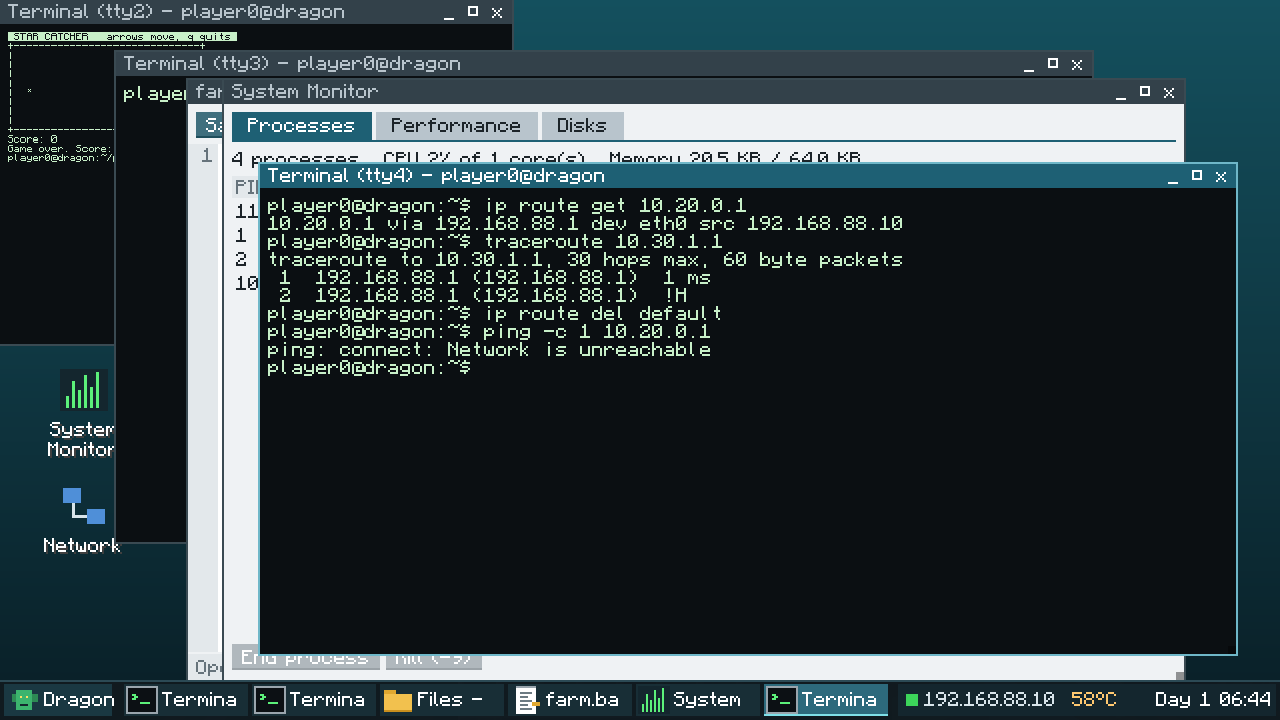
ping reports ttl= for each reply, and the errors a real network gives:
| Message | Meaning |
|---|---|
connect: Network is unreachable |
This computer has no route to that address. |
Destination Net Unreachable |
A router on the way has no route. |
Destination Host Unreachable |
The last router could not find the host with ARP. |
Time to live exceeded |
The packet passed too many routers (ping -t sets the TTL). |
The switch as a router
The switch routes packets sent to it for addresses it does not own.
- IP → Addresses: one or more addresses per VLAN interface (
bridgefor VLAN 1,vlanNfor the others). Flags showDfor dynamic andXfor disabled. - IP → Routes: static routes and a default route. The longest matching prefix wins.
- Each hop lowers the TTL by one; at zero the switch sends ICMP time exceeded.
- With no route it sends net unreachable; when ARP for the next hop fails, host unreachable.
- The firewall's forward chain filters routed traffic; the input chain protects the switch's own addresses.
Two switches with static routes to each other's subnets connect two networks; traceroute then shows
both hops.
DHCP server
IP → DHCP Server lists the servers; DHCP Setup creates one for a VLAN with its address pool, gateway and lease time.
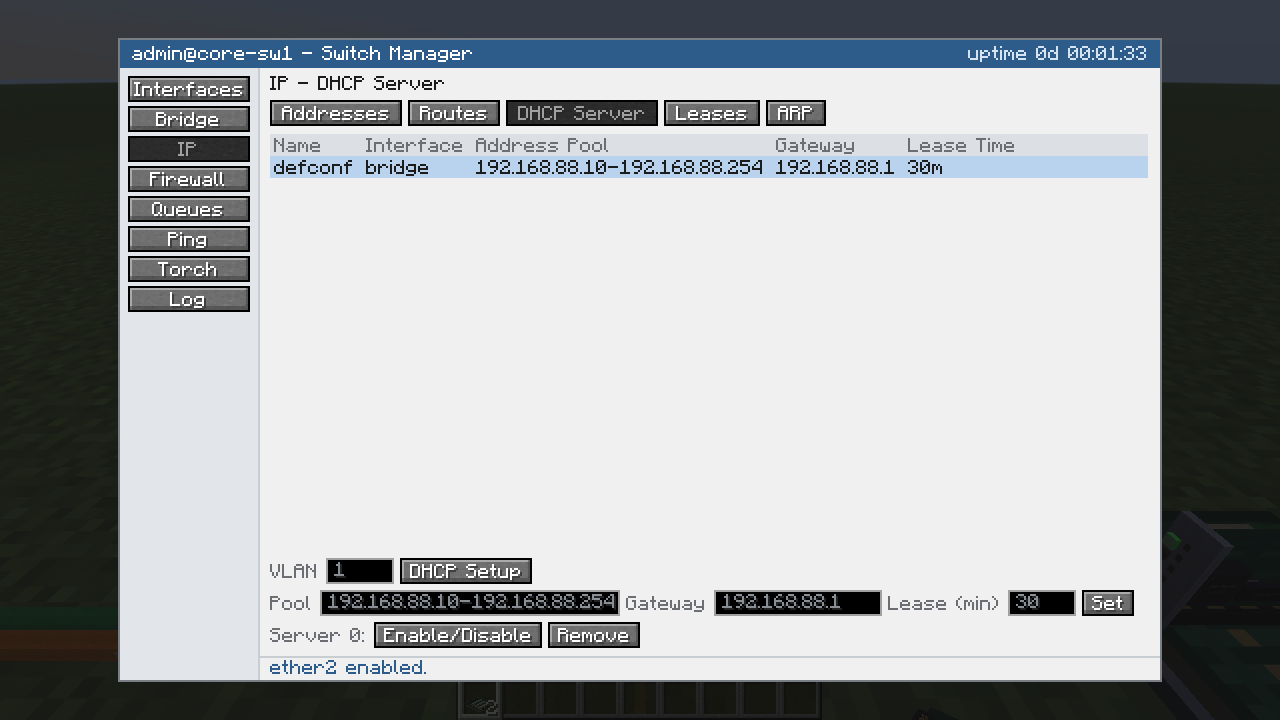
- The server runs the full DISCOVER, OFFER, REQUEST, ACK exchange.
- Before offering a new address it probes it with ARP and skips addresses already in use, such as a computer set by hand.
- The same MAC address gets the same address again.
- IP → Leases shows every lease with its host name. Make a lease static to reserve that address, or remove it.
DHCP client on the switch
A switch can take its own address from another switch's DHCP server, for example to join an upstream network. Open IP → DHCP Client and Add a client on a VLAN.
- While bound, the address appears under Addresses with flag
D. With Default route on, the client also installs a dynamic default route through the upstream gateway. - Renew, Release, Enable/Disable and Remove work as in RouterOS. Disabling releases the lease.
- The columns show the interface, default route, status, address, gateway, DHCP server and when the lease expires.
- Dynamic addresses and routes cannot be removed or disabled by hand.
Note
DNS and NTP are not part of the stack, so the DHCP client has no peer DNS or NTP options, and its default route distance is fixed at 1. The switch is configured through Switch Manager only; DragonOS has no RouterOS command line.