
VLANs
Keep machines apart with 802.1Q VLANs, access and trunk ports, and carry several VLANs between switches.
VLANs split one physical network into separate ones. Computers in different VLANs cannot reach each other unless a switch routes between them. VLANs follow 802.1Q.
Access and trunk ports
Set each port in Switch Manager under Bridge → Ports.
| Port type | Behaviour |
|---|---|
| Access | Untagged frames arriving at the port go into its PVID. Use it for computers. |
| Trunk | Also carries the tagged VLANs you list. Use it between switches, so two switches share several VLANs over one cable. |
Bridge → VLANs shows which ports carry each VLAN, and Bridge → Hosts shows the MAC addresses the switch has learned on each port.
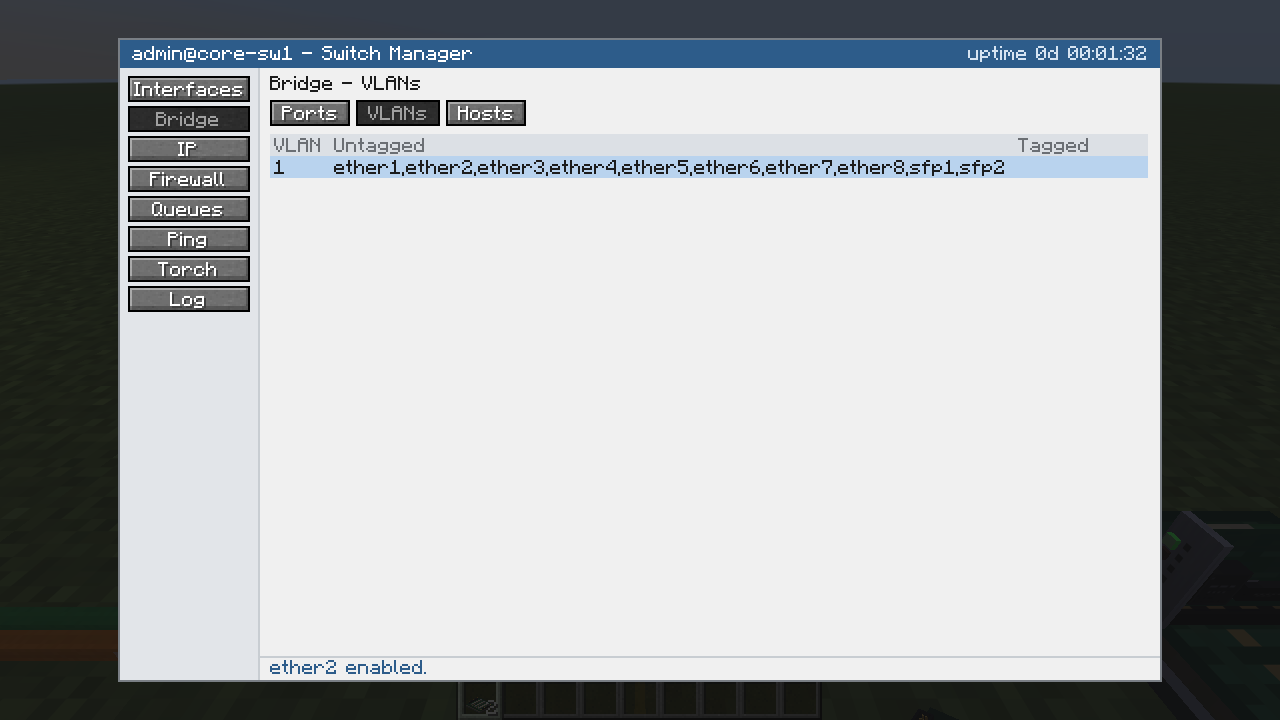
Example: farm and office
Two groups of computers on one switch, kept apart:
- Open Switch Manager → Bridge → Ports.
- Set ether1 to ether4 as access ports with PVID 10 (the farm).
- Set ether5 to ether7 as access ports with PVID 20 (the office).
- Set ether8 as a trunk carrying tagged VLANs 10 and 20, and run it to a second switch configured the same way.
Computers on ether1 to ether4 now reach only each other and the farm ports of the second switch.
Routing between VLANs
To let VLANs talk, give the switch an address in each one under IP → Addresses. VLAN 1's
interface is bridge; the others are named vlanN, such as vlan10. Then set each computer's gateway
to the switch's address in its VLAN. See IP, routing and DHCP,
and use the Firewall's forward chain to control what may cross.