
Network basics
How computers talk over Ethernet: cards, cables, switches, addresses, and why cables never load chunks.
Computers anywhere in a dimension can talk to each other over Ethernet, across a whole server. The network is modelled on real hardware: Cat5 cable with RJ45 plugs, managed switches running a RouterOS-style system, single-mode fibre with SFP optics, VLANs, IP routing and DHCP.
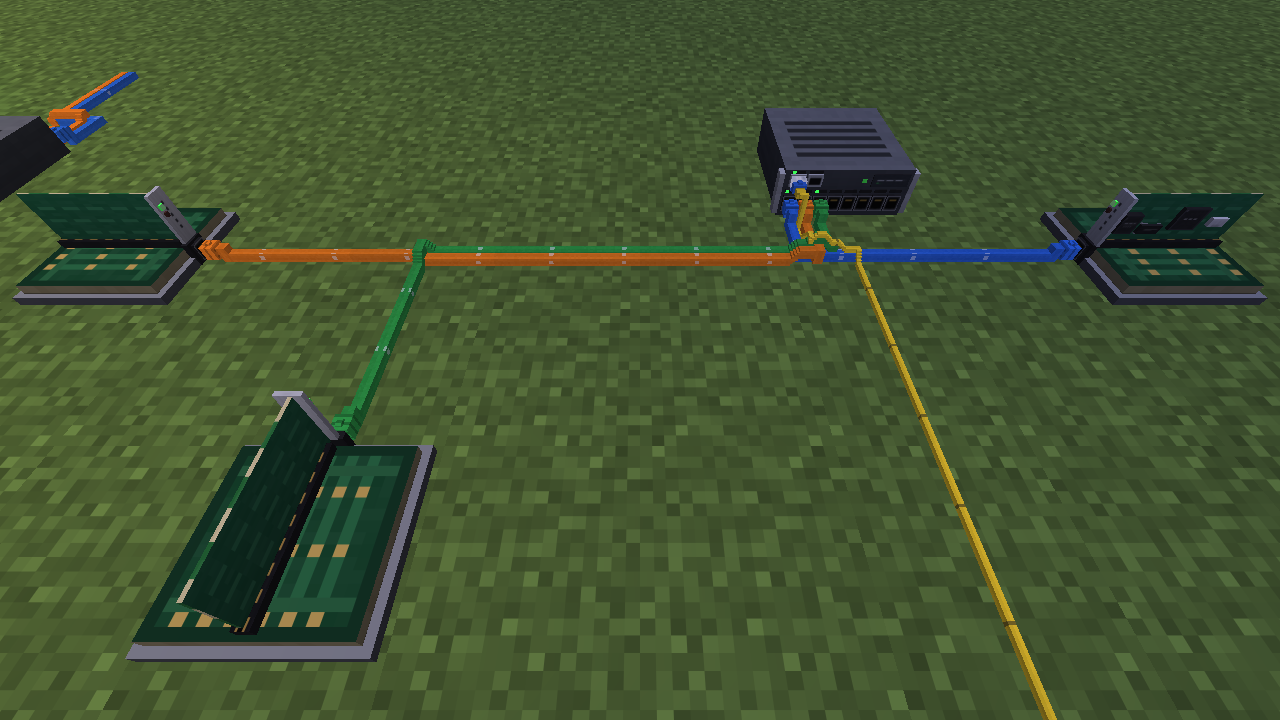
The parts
| Part | What it is |
|---|---|
 Network Card |
The computer's Ethernet interface. Install it in an  Expansion Card Rack or on a backplane slot. |
 Blue Network Cable (ether1) |
Cat5 cable in eight colours. |
 Network Switch |
An 8-port managed switch with two SFP cages for fibre. It also routes. |
 Network Repeater |
Regenerates up to eight links for another 100 blocks. |
 Yellow Fiber Optic Cable (sfp1) |
Single-mode fibre for long links. |
 SFP Transceiver |
The 1000BASE-LX optic a fibre link needs at each end. |
 2-Post Network Rack |
Stack switches and repeaters, each with its own cable tray. |
Your first network
- Install a Network Card in each computer's Expansion Card Rack.
- Place a Network Switch.
- Cable each card to a switch port; see Laying cable.
- On each computer, open the desktop's Network window and choose Get by DHCP. A new switch
hands out addresses in
192.168.88.0/24by itself. - In the Terminal,
pingthe other computer's address.
dhclient
ip addr
ping 192.168.88.11
Cable colours
Each colour of copper cable belongs to one switch port:
| Colour | Port | Colour | Port |
|---|---|---|---|
| Blue |
ether1 |  Red |
ether5 |
 Orange |
ether2 |  Purple |
ether6 |
 Green |
ether3 |  White |
ether7 |
 Yellow |
ether4 |  Black |
ether8 |
Fibre comes in yellow for sfp1 and  aqua for
sfp2. Dye any network cable to change its colour.
Using a cable on a particular jack plugs it into that jack, whatever its colour.
Distances
| Link | Reach |
|---|---|
| Copper | 100 blocks between active devices, as for real twisted-pair Ethernet. A switch or repeater regenerates the signal for another 100. |
| Fibre | 10,000 blocks, between two SFP Transceivers. |
Addresses
Every card has a MAC address. Give it an IPv4 address:
- Get by DHCP in the desktop Network window,
dhclientin the shell, orNETDHCPin DragonBASIC; - or set one by hand: an Address (with
/prefix) and Gateway in the Network window and Set static,ip addr add 10.0.0.5/24 dev eth0in the shell, orNETIP "10.0.0.5/24"in BASIC.
Cards find each other's MAC addresses with ARP, as on a real network. See IP, routing and DHCP.
Cables never load chunks
Laying cable and placing devices records them in the dimension's network map, which is saved with the world. Traffic is routed through that map alone, so a cable can cross thousands of chunks without loading any of them.
A message for a computer whose chunk is not loaded waits in its card's inbox, which holds 64 messages, and is there when the computer loads again. Messages beyond that are dropped and counted, as a full buffer would.
Note
There is no bridge to real-world networks. It would need opt-in server configuration and careful security, so it is deliberately left out.