
The network switch
The 8-port managed switch and its Switch Manager: interfaces, bridge, IP, firewall, queues, ping, torch and log.
The  Network Switch is an 8-port managed switch with two SFP cages, run by a
RouterOS-style system. It switches, routes between VLANs and subnets, serves DHCP, filters traffic and
limits bandwidth.
The hardware
- Eight RJ45 jacks on the front, ether1 at the left as you face it.
- Two SFP cages, sfp1 and sfp2, for fibre; see Fibre and repeaters.
- Each port has a green link LED and an amber activity LED.
- Click a jack to see what is plugged into it.
Switch Manager
Right-click the switch away from its ports to open Switch Manager. The menu down the left side has Interfaces, Bridge, IP, Firewall, Queues, Ping, Torch and Log.
- Left-click selects a row; the mouse wheel scrolls long lists.
- In Interfaces, right-click a row to enable or disable it, set traffic limits, open its bridge settings, or watch it in Torch.
- The server checks every change.
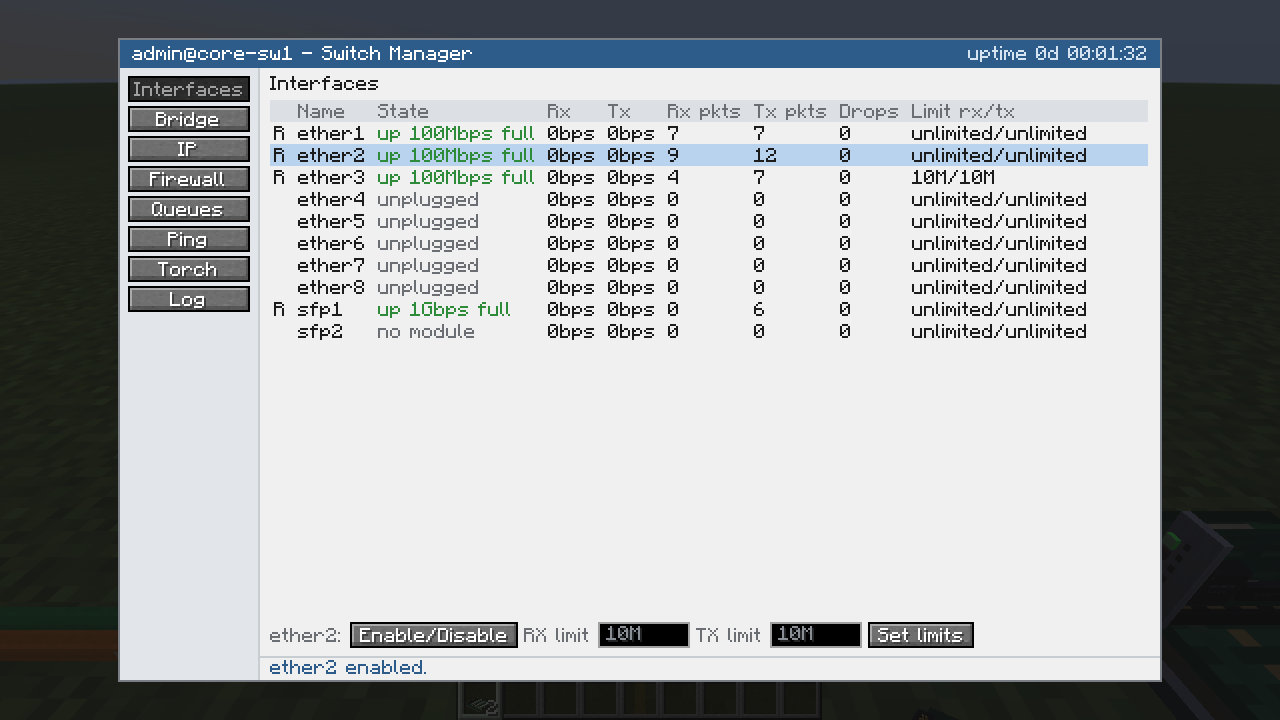
Interfaces
Each port's link state and speed, live RX and TX rates, packet and drop counters, and its RX and TX rate limits (512k, 10M or 1G; empty means unlimited). Enable or disable a port here.
Bridge
- Ports: each port is an access or trunk port, with its PVID and tagged VLANs.
- VLANs: which ports carry each VLAN.
- Hosts: the learned MAC address table, with Flush.
See VLANs.
IP
The switch's identity, and its tabs Addresses, Routes, DHCP Client, DHCP Server, Leases and ARP. See IP, routing and DHCP.
Firewall
Filter rules run top to bottom, and the first match decides. Each rule has:
- a chain: forward for traffic the switch passes on, input for traffic to the switch itself;
- source and destination address or network (such as
10.0.0.0/24); - protocol: udp for messages, icmp for ping, arp;
- in and out interface;
- an action: drop, accept, or log (write to the log and carry on).
Rules count packets and bytes. Enable, disable, remove, reorder or reset them.
Queues
Simple queues: a target address or network with an upload limit (traffic from it) and a download limit (traffic to it). The first queue that matches applies; traffic over the limit is dropped and counted.
Ping
Ping any address from the switch's own address, 1, 4 or 10 times, with each echo's time and the packet loss.
Torch
Live flows on one interface: source, destination, protocol, VLAN, TX and RX rate over the last second, and packet counts.
Log
Cables plugged and unplugged, learned hosts, transceivers, logged firewall matches, and every configuration change with who made it.
Factory settings
A new switch starts like a RouterOS default configuration:
- address
192.168.88.1/24on the bridge (VLAN 1); - a DHCP server leasing
192.168.88.10to192.168.88.254, with the switch as gateway and a 30-minute lease.
So computers cabled to a new switch get working addresses with DHCP straight away.